Adam Dunkels, PhD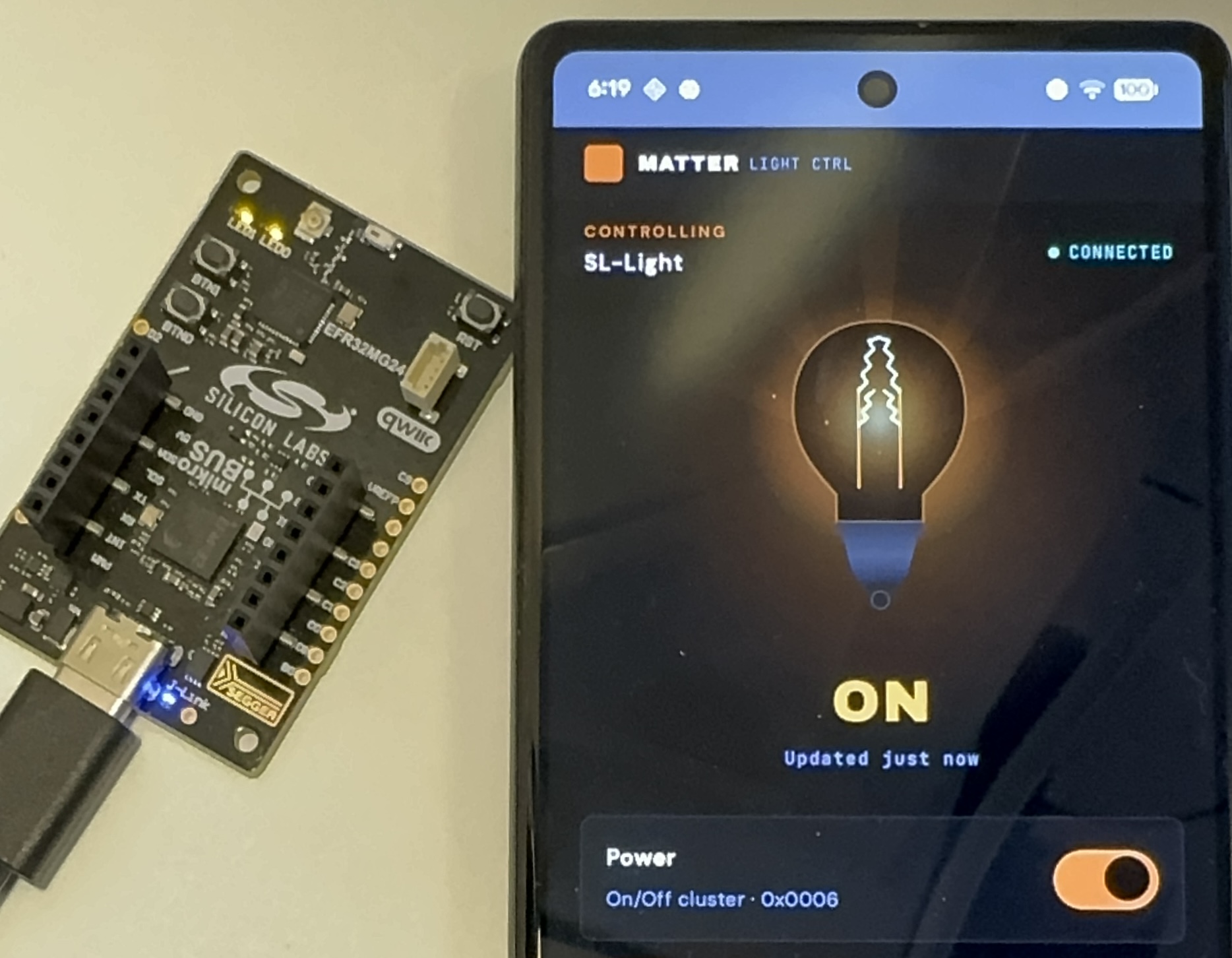
Developing a smart home product takes serious effort. Can AI make it easier? Let’s try to vibe code a working prototype of a smart home product with the Matter smart home standard, which major players like IKEA have bet big on, and see where it gets us.
We got it to work. AI agents built a full Matter system with embedded firmware, Thread networking, a border router, and an Android commissioning app. What used to take weeks of setup took days. Here is what we learned.
What makes Matter interesting is that it may not be mainstream enough for AI models to be specifically trained on, so the agents will have to do a lot of work on their own to learn the system on the fly. And there is lots to learn: how to build firmware, how to set up the networking, how to build an Android app for it. There are step-by-step examples to follow, which can be intimidating for humans, but which should be easy enough for agents to follow. But will that be enough for a set of AI agents to create a working system?
With Matter, Even a Simple Setup is Complex
Matter is an ambitious wireless standard: it has support from major players, including both Google and Apple, and is defined over both WiFi and the IEEE 802.15.4-based standard called Thread. Internally, the Matter system is built around IPv6 and requires significant insight into how IPv6 works to set up. But when Matter is used in consumer grade smart home systems, this complexity is completely hidden inside the Matter devices and the Matter hub.
The code base is open source, which gives our agents a fighting chance, but it is large (23k+ files), consists of multiple submodules (~100), supports hardware from 12 different vendors, and can be difficult to work with
To build a Matter smart home system from scratch, we need the following components:
- The firmware for embedded development boards, one as the smart home device, and one as the border router. We use the Silicon Labs xG24 kit
- One Android app, to work with our Matter system
- A regression testing framework to ensure that the resulting system works
Thus the setup we want the AI agents to work on is something like this:
- A devcontainer in which all the development tools live so that we can compile the code without installing tools on our laptop
- A full Matter installation inside the devcontainer so that the agents can build the appropriate firmware
- A border router setup that can be run inside the devcontainer, instead of having a separate Raspberry Pi board
- An Android development environment that the agents can use to develop and build the Android app
Then we instruct the agents to build a system with a Matter lightbulb (running on one of the development boards), one Matter hub radio control board (using the other development board), and one Android app (running on an actual Google Pixel 6a phone).
The different components need to work together over multiple wireless media using different protocols. The structure of the setup looks like this (as a classic RFC style diagram):
+-------------------------------------------+
|               Android Phone               |
+---+-----------------------------------+---+
    |                                   |
 BLE (PASE)                        WiFi / UDP
commissioning                  CASE + On/Off control
    |                                   |
    |                                   |
    |    +------------------------------+----------+
    |    |  Windows Host                |          |
    |    |                              |          |
    |    |  +---------------------------+-----+    |
    |    |  |  Devcontainer                   |    |
    |    |  |                                 |    |
    |    |  |  +-------------+ +-----------+  |    |
    |    |  |  | otbr-agent | | socat CASE |  |    |
    |    |  |  | (border    | | relay      |  |    |
    |    |  |  |  router)   | |            |  |    |
    |    |  |  +------------+ +------------+  |    |
    |    |  |  +---------------+              |    |
    |    |  |  | avahi         |              |    |
    |    |  |  | _matter._tcp  |              |    |
    |    |  |  | SRP server    |              |    |
    |    |  |  +---------------+              |    |
    |    |  +------+-------------------+------+    |
    |    |         |                   |           |
    |    |         | Spinel/UART       | UART      |
    |    |         |                   |           |
    |    +---------+-------------------+-----------+
    |              |                   |
    |              |                   |
    |    +------+-----------+  +----+-------------+
    |    | xG24 RCP Board   |  | xG24 Lighting    |
    |    | OT RCP firmware  |  | Matter light fw  |
    |    +------------------+  +------------------+
    |              |                      |  |
    |              |  Thread (802.15.4)   |  |
    |              +----------------------+  |
    |                                        |
    |                                        |
    |         BLE (PASE) commissioning       |
    +----------------------------------------+
That’s a lot of complexity for what amounts to turning on and off an LED.
Now let’s let our AI agents loose on the setup and see what they achieve.
What Did the AI Agents Build?
The end result is a fully automated setup with an Android app that discovers and connects with a Matter-enabled light that is able to switch the light on and off. The entire system is autonomous: everything is controlled by the regression testing script that checks that every single step in the chain works. And it does this by remotely controlling the Android app.
The resulting system does the following:
- Builds and flashes the firmware for the two development boards
- Builds and installs the Android app on the Android device
- Does a factory reset of the lighting device, so it is ready to be re-discovered
- Starts a discovery over Bluetooth on the Android app
- Finds the lighting device
- Commissions the lighting device into the Thread network
- Turns on the light on the board from within the Android app to confirm that everything works
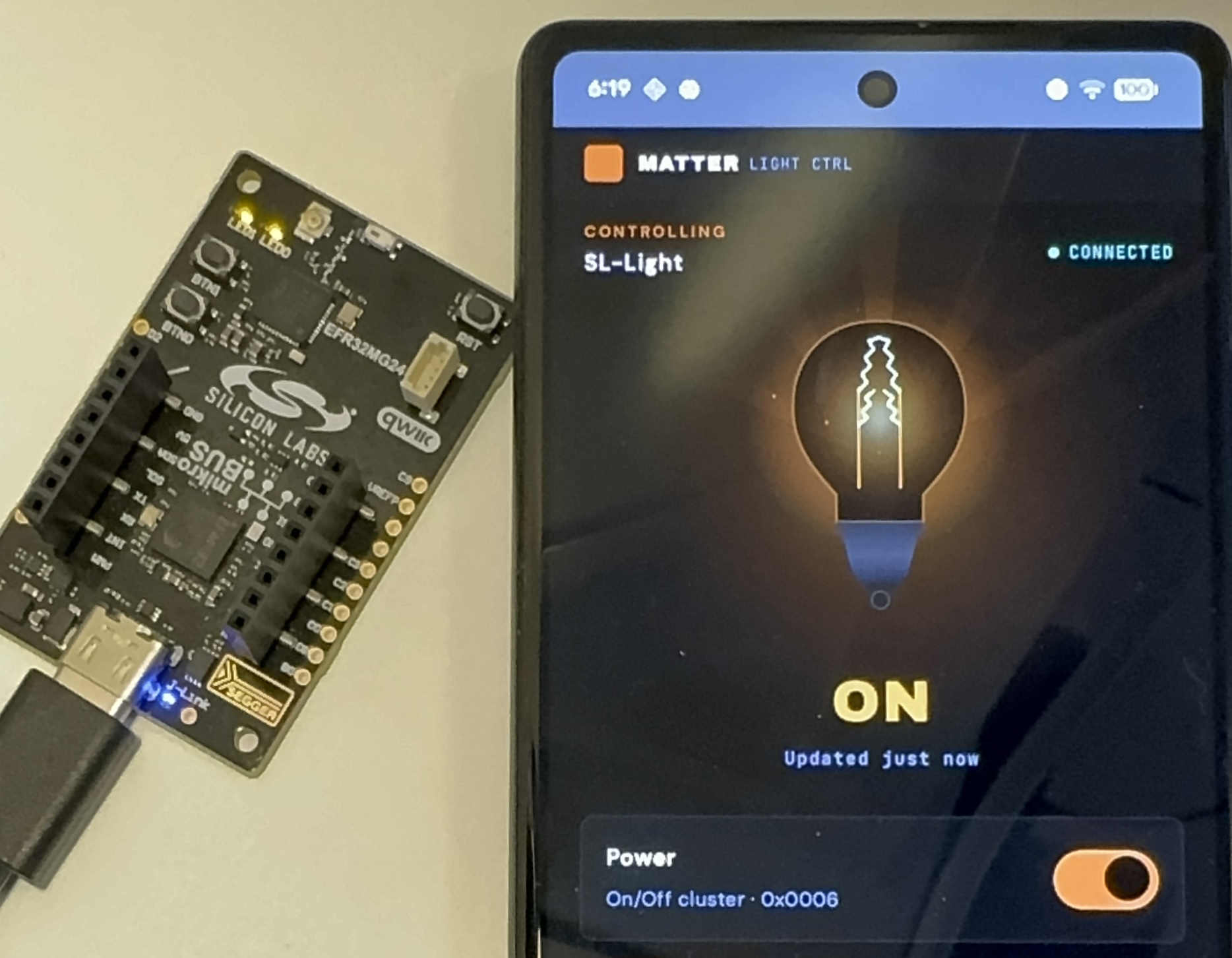
On the left we have our development board running as a Matter light bulb. On the right we have an Android phone running the app that the agents developed for us. Tapping the toggle button in the app controls the LED on the board, as if it was a real light bulb.
Not seen in the picture is the other development board running the Thread radio co-processor. All are connected via a USB hub to the development laptop, which is running the Matter hub inside the devcontainer.
The system is set up so that a script on the laptop is controlling both the Android phone and the development boards. This lets the entire system run autonomously: no human input is needed to verify that everything works as it should.
How Much Human Input is Needed?
This project needed a significant human presence to make it work. The work had to be manually broken down into a set of individual tasks:
- Devcontainer – Set up a devcontainer suitable for building Matter / Thread firmware for the Silabs xG24 boards.
- Android – Add the necessary build tools to the devcontainer for building Android apps and develop a simple Android app for Matter lighting control.
- Commissioning flow – Develop an automated commissioning flow with the Android app, the border router, and a lighting board.
- Debug – Debug the commissioning flow and update the Matter firmware with shell commands that allow the commissioning process to be started with no user input.
- Visual design – Implement a new visual design for the Android app, based on user-provided design files (developed via a prompt in Claude Design)
- Performance – Improve the performance of the commissioning flow
- Automation – Develop a fully automated regression test for the commissioning flow
Each of these steps required significant hand-holding. In particular, the commissioning flow was tricky to get right. The agents were able to figure most of it out by themselves, but they also took several wrong turns and needed to be steered in the right direction by asking them to stop and re-plan what they were working on as their context windows were filling up.
By far the most expensive operation was the commissioning flow debugging and performance improvement, which was mostly unattended. This was responsible for about half of the tokens spent. To debug the commissioning flow, the agents would start reading the Matter source code to figure out how the process worked. The sheer size of the codebase caused the agents to spend a lot of tokens on just reading source code. Human input was eventually required to make the agents break out of this.
At one point, the commissioning flow ended up having a 60 second delay from finding the device to having it commissioned and ready to accept commands. The agent that was debugging this started going deep into the Matter SDK code, which was only seen because the token count started to quickly increase. The only way to break it out of this was to tell it to stop reading SDK code, because it was using up tokens. After several wrong turns, the agent eventually started reading the documentation instead, which led to it reducing the 60 second delay to a more reasonable 4 second delay.
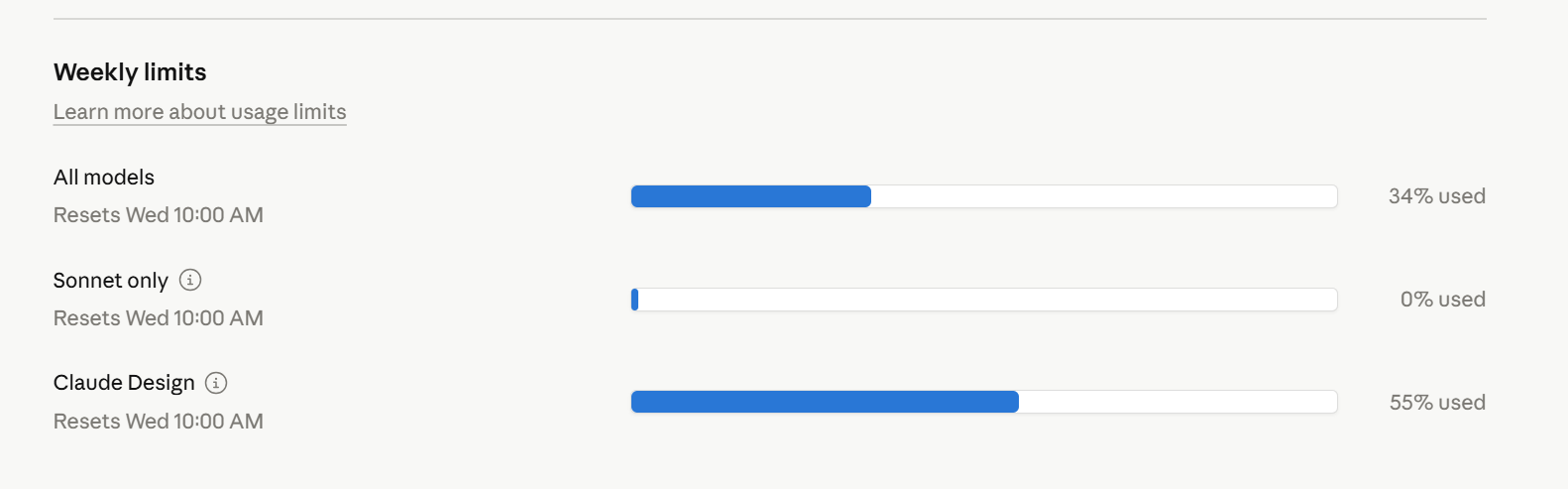
This system was built with Claude Code and its Opus 4.6 model. In total, this project used up 34% of the weekly limit on a Claude Code 5x Max subscription. This is a meaningful chunk of tokens, but not excessive for a serious agentic task. Claude Design was used to one-shot prompt the Android app design, which used 55% of the available tokens.
Can AI Speed Up Smart Home Product Development?
Yes. What used to take weeks of setup now takes days. But this was far from a one-shot prompt into an AI chatbot. It required a significant understanding of the underlying technology and a lot of task planning to make it work. Setting up a development environment for a Matter smart home device, with a full commissioning flow with hardware in the loop, is a serious task, but one that is completely doable with a set of AI agents.
The most surprising part of this project was how well the agents debugged the IPv6 setup of the Matter flow. IPv6 is mainstream enough for the models to have it in their training set, so in a way this was expected. But the agents picked up the Matter-specific parts quickly too. Border routers, Docker network interfaces, Thread commissioning. They learned the system by reading the documentation and, sometimes, the source code.
The human in the loop is still doing real engineering work: breaking down tasks, catching wrong turns, understanding the system well enough to steer. The agents handle the volume. For a complex embedded project like this, that trade-off is worth it.
 Whose Problem Are We Solving? A Question That Cuts Through The Fog